
Architecture overview
Both integrations share the same OAuth 2.0 server and the same 7 tool routes under /api/mcp/tools/. The difference is how each client authenticates:
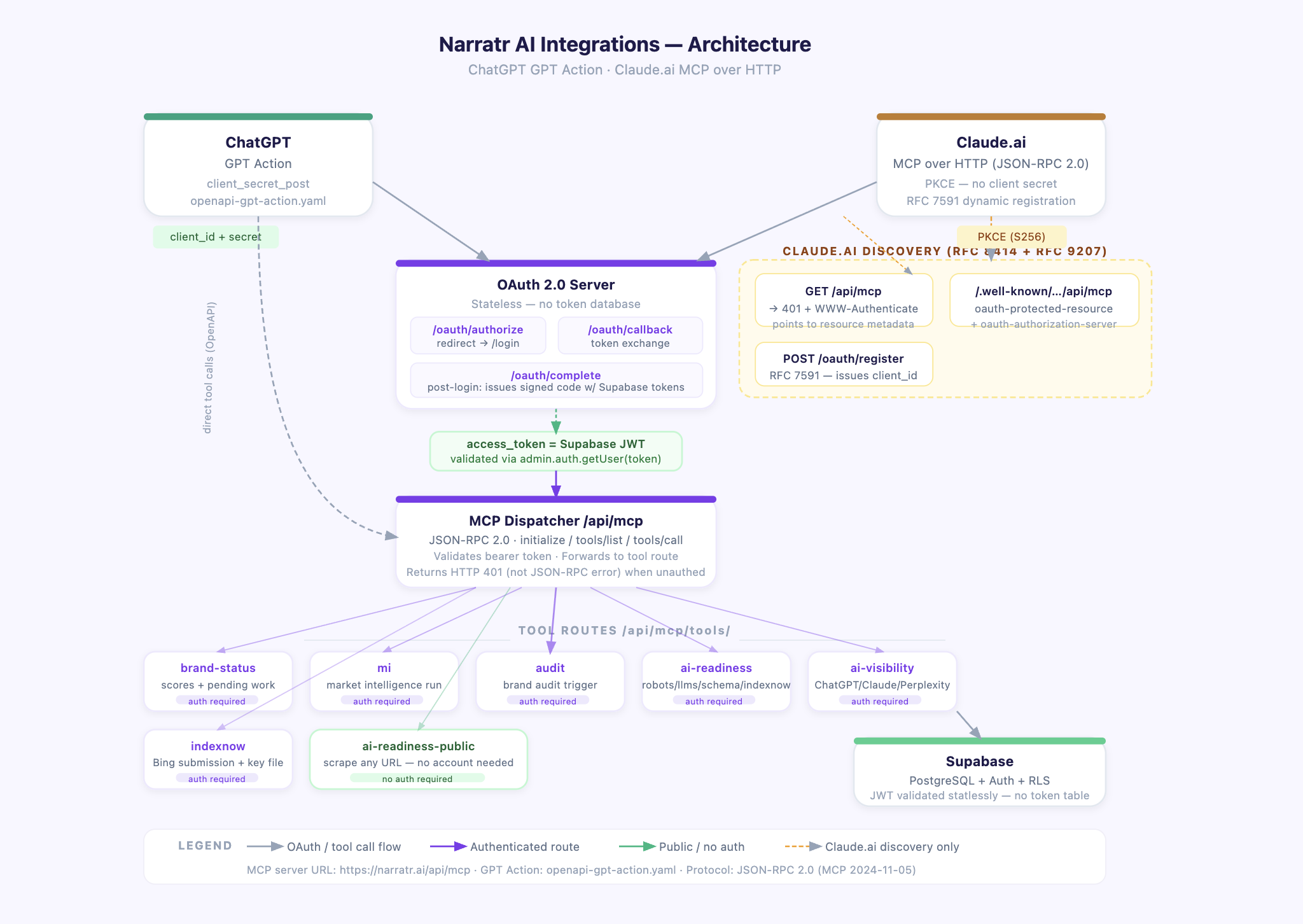
ClientAuth methodClient secret?DiscoveryChatGPT GPT ActionAuthorization code + client_secretYes (MCP_GPT_CLIENT_ID / MCP_GPT_CLIENT_SECRET)OpenAPI YAMLClaude.ai MCPAuthorization code + PKCE (RFC 7636)No/.well-known metadata URLs
All tokens are Supabase JWTs. There is no token database — the OAuth code is a signed, short-lived payload containing the Supabase access + refresh tokens.
File map
app/
  api/mcp/
    route.ts                          # MCP JSON-RPC dispatcher + GET 401 for discovery
    oauth/
      authorize/route.ts              # Authorization endpoint — redirects to /login
      callback/route.ts               # Token endpoint — exchanges code for tokens
      complete/route.ts               # Post-login callback — builds and issues the code
      register/route.ts               # RFC 7591 dynamic client registration (Claude.ai)
    tools/
      brand-status/route.ts
      mi/route.ts
      audit/route.ts
      ai-readiness/route.ts
      ai-readiness-public/route.ts    # No auth required
      ai-visibility/route.ts
      indexnow/route.ts

  .well-known/
    oauth-authorization-server/
      route.ts                        # Auth server metadata (root)
      api/mcp/route.ts                # Auth server metadata (path-suffixed, Claude.ai)
    oauth-protected-resource/
      route.ts                        # Protected resource metadata (root)
      api/mcp/route.ts                # Protected resource metadata (path-suffixed, RFC 9207)

public/
  openapi-gpt-action.yaml             # OpenAPI spec uploaded to ChatGPT GPT Action
Part 1 — ChatGPT GPT Action
How it works
ChatGPT calls the tool routes directly over HTTPS using the OpenAPI spec. Auth uses OAuth 2.0 with client_secret_post. The GPT was published to the ChatGPT store.
Link: https://chatgpt.com/g/g-6a09fa9b7c188191a9f7e3edc5e101cb-narratr-brand-intelligence
OpenAPI spec: public/openapi-gpt-action.yaml
The spec is uploaded directly into the ChatGPT GPT Action UI. It defines all 7 tool routes as POST operations.
yamlopenapi: 3.1.0
info:
  title: Narratr Brand Intelligence API
  version: 1.0.0

servers:
  - url: https://narratr.ai

paths:
  /api/mcp/tools/brand-status:
    post:
      operationId: narratr_brand_status
      summary: Get current status and scores for a brand
      requestBody:
        required: true
        content:
          application/json:
            schema:
              type: object
              required: [website_url]
              properties:
                website_url:
                  type: string

  /api/mcp/tools/mi:
    post:
      operationId: narratr_mi
      # ...

  /api/mcp/tools/audit:
    post:
      operationId: narratr_audit
      # ...

  /api/mcp/tools/ai-readiness:
    post:
      operationId: narratr_ai_readiness
      # ...

  /api/mcp/tools/ai-visibility:
    post:
      operationId: narratr_ai_visibility
      # ...

  /api/mcp/tools/indexnow:
    post:
      operationId: narratr_indexnow
      # ...

  /api/mcp/tools/ai-readiness-public:
    post:
      operationId: narratr_ai_readiness_public
      # No auth required
Full spec is at public/openapi-gpt-action.yaml.
Environment variables
MCP_GPT_CLIENT_ID=<uuid>
MCP_GPT_CLIENT_SECRET=<secret>
Set in ChatGPT GPT Action UI → Authentication → OAuth → Client ID / Secret.
Part 2 — Claude MCP
How Claude.ai discovers the server
Claude.ai uses /.well-known metadata URLs defined in RFC 8414 and RFC 9207.
Step 1: GET /api/mcp
Claude.ai makes a GET request to the MCP server URL. It expects HTTP 401 with a WWW-Authenticate header pointing to the resource metadata URL.
ts// app/api/mcp/route.ts
export async function GET() {
  const base = getBaseUrl();
  return new NextResponse(null, {
    status: 401,
    headers: {
      'WWW-Authenticate': `Bearer realm="${base}/api/mcp", resource_metadata="${base}/.well-known/oauth-protected-resource/api/mcp"`,
    },
  });
}
Step 2: GET /.well-known/oauth-protected-resource/api/mcp
Per RFC 9207, Claude.ai appends the server's path (/api/mcp) to the well-known URL. This file identifies the auth server.
ts// app/.well-known/oauth-protected-resource/api/mcp/route.ts
export async function GET() {
  const base = getBaseUrl();
  return NextResponse.json({
    resource: `${base}/api/mcp`,
    authorization_servers: [base],
    bearer_methods_supported: ['header'],
    scopes_supported: ['brand:read', 'brand:write'],
  });
}
Step 3: GET /.well-known/oauth-authorization-server/api/mcp
Claude.ai fetches auth server metadata, again path-suffixed.
ts// app/.well-known/oauth-authorization-server/api/mcp/route.ts
export async function GET() {
  const base = getBaseUrl();
  return NextResponse.json({
    issuer: base,
    authorization_endpoint: `${base}/api/mcp/oauth/authorize`,
    token_endpoint: `${base}/api/mcp/oauth/callback`,
    registration_endpoint: `${base}/api/mcp/oauth/register`,  // required for Claude.ai
    response_types_supported: ['code'],
    grant_types_supported: ['authorization_code', 'refresh_token'],
    code_challenge_methods_supported: ['S256'],
    token_endpoint_auth_methods_supported: ['client_secret_post', 'none'],
  });
}
Step 4: POST /api/mcp/oauth/register
Claude.ai requires RFC 7591 Dynamic Client Registration before starting OAuth. It registers itself and gets back a client_id. This is stateless — no DB storage.
ts// app/api/mcp/oauth/register/route.ts
import { randomUUID } from 'crypto';

export async function POST(req: NextRequest) {
  let body: Record<string, unknown> = {};
  try { body = await req.json(); } catch { /* empty body is fine */ }

  const clientId = `mcp_${randomUUID().replace(/-/g, '')}`;

  return NextResponse.json({
    client_id: clientId,
    client_id_issued_at: Math.floor(Date.now() / 1000),
    redirect_uris: body.redirect_uris ?? [],
    grant_types: ['authorization_code', 'refresh_token'],
    response_types: ['code'],
    token_endpoint_auth_method: 'none',       // PKCE — no secret needed
    code_challenge_methods_supported: ['S256'],
    client_name: body.client_name ?? 'MCP Client',
  }, { status: 201 });
}
Part 3 — Shared OAuth flow
Both ChatGPT and Claude share the same authorize → login → complete → token exchange flow. The difference is PKCE vs client_secret.
Step 1: /api/mcp/oauth/authorize — redirect to login
ts// app/api/mcp/oauth/authorize/route.ts
export async function GET(req: NextRequest) {
  const { searchParams } = req.nextUrl;
  const clientId = searchParams.get('client_id');
  const redirectUri = searchParams.get('redirect_uri');
  const state = searchParams.get('state');
  const codeChallenge = searchParams.get('code_challenge');       // PKCE (Claude.ai)
  const codeChallengeMethod = searchParams.get('code_challenge_method');

  // ChatGPT uses a known client_id; Claude.ai uses PKCE with a dynamic client_id
  const isGptClient = clientId === process.env.MCP_GPT_CLIENT_ID;
  const isMcpClient = !isGptClient && Boolean(codeChallenge);

  if (!isGptClient && !isMcpClient) {
    return NextResponse.json({ error: 'invalid_client' }, { status: 401 });
  }

  // Pack all OAuth state into a signed cookie so /complete can reconstruct it
  const payload = JSON.stringify({
    redirectUri, state, clientId,
    codeChallenge: codeChallenge ?? null,
    codeChallengeMethod: codeChallengeMethod ?? null,
    exp: Date.now() + 10 * 60 * 1000,   // 10 min TTL
  });
  const encoded = Buffer.from(payload).toString('base64url');
  const sig = createHmac('sha256', process.env.MCP_GPT_CLIENT_SECRET ?? '').update(encoded).digest('hex');

  const res = NextResponse.redirect(`${base}/login?next=/api/mcp/oauth/complete`);
  res.cookies.set('mcp_oauth_state', `${encoded}.${sig}`, {
    httpOnly: true, secure: true, sameSite: 'lax', maxAge: 600,
  });
  return res;
}
Step 2: User logs in at /login
The login page redirects to /api/mcp/oauth/complete after a successful Supabase session is established. No special logic needed — the existing magic-link / password flow handles it.
Step 3: /api/mcp/oauth/complete — issue the code
ts// app/api/mcp/oauth/complete/route.ts
export async function GET(req: NextRequest) {
  const stateCookie = req.cookies.get('mcp_oauth_state')?.value;
  const oauthState = verifyStateCookie(stateCookie);   // HMAC + expiry check
  if (!oauthState) return redirect('/login?error=mcp_state_invalid');

  const supabase = await createSupabaseServerClient();
  const { data: { session } } = await supabase.auth.getSession();
  if (!session) return redirect('/login?next=/api/mcp/oauth/complete');

  // Encode Supabase tokens + PKCE challenge into a signed short-lived code
  const codePayload = JSON.stringify({
    a: session.access_token,
    r: session.refresh_token,
    cc: oauthState.codeChallenge,   // stored for PKCE verification at token exchange
    exp: Date.now() + 5 * 60 * 1000,
  });
  const encodedCode = Buffer.from(codePayload).toString('base64url');
  const code = `${encodedCode}.${signPayload(encodedCode)}`;

  const redirectUrl = new URL(oauthState.redirectUri);
  redirectUrl.searchParams.set('code', code);
  redirectUrl.searchParams.set('state', oauthState.state);

  const res = NextResponse.redirect(redirectUrl.toString());
  res.cookies.delete('mcp_oauth_state');
  return res;
}
Step 4: /api/mcp/oauth/callback — token exchange
ts// app/api/mcp/oauth/callback/route.ts
export async function POST(req: NextRequest) {
  // Accepts both application/x-www-form-urlencoded and application/json
  const body = /* parse body */;
  const { grant_type, code, refresh_token, client_id, client_secret, code_verifier } = body;

  if (grant_type === 'authorization_code') {
    const decoded = verifyCode(code);   // HMAC + expiry check
    if (!decoded) return error('invalid_grant');

    if (decoded.cc) {
      // PKCE flow (Claude.ai) — verify code_verifier against stored challenge
      const digest = createHash('sha256').update(code_verifier).digest('base64url');
      if (digest !== decoded.cc) return error('invalid_grant');
    } else {
      // Client secret flow (ChatGPT)
      if (client_id !== process.env.MCP_GPT_CLIENT_ID ||
          client_secret !== process.env.MCP_GPT_CLIENT_SECRET) {
        return error('invalid_client');
      }
    }

    // Return Supabase JWT directly as the access_token — no DB storage needed
    return NextResponse.json({
      access_token: decoded.a,     // Supabase access_token
      refresh_token: decoded.r,    // Supabase refresh_token
      token_type: 'bearer',
      expires_in: 3600,
    });
  }

  if (grant_type === 'refresh_token') {
    // Delegate to Supabase — it manages rotation
    const { data, error } = await admin.auth.refreshSession({ refresh_token });
    return NextResponse.json({
      access_token: data.session.access_token,
      refresh_token: data.session.refresh_token,
      token_type: 'bearer',
      expires_in: 3600,
    });
  }
}
Key insight: The access_token IS the Supabase JWT. When a tool route calls getUser(), it validates the bearer token directly via admin.auth.getUser(token). No token table, no session store.
Part 4 — MCP JSON-RPC dispatcher
Claude.ai communicates with the MCP server using JSON-RPC 2.0 over HTTP POST.
ts// app/api/mcp/route.ts (POST handler)
export async function POST(req: NextRequest) {
  const rpc = await req.json();
  const { id, method, params = {} } = rpc;

  // Handshake — no auth required
  if (method === 'initialize') {
    return ok(id, {
      protocolVersion: '2024-11-05',
      capabilities: { tools: {} },
      serverInfo: { name: 'Narratr Brand Intelligence', version: '1.0.0' },
    });
  }

  // Tool discovery — no auth required
  if (method === 'tools/list') {
    return ok(id, { tools: TOOLS });  // TOOLS array with name, description, inputSchema
  }

  // Tool execution — auth required (except narratr_ai_readiness_public)
  if (method === 'tools/call') {
    const toolName = params.name;
    const isPublic = PUBLIC_TOOLS.has(toolName);

    if (!isPublic) {
      const user = await getUser();
      if (!user) {
        // Return HTTP 401, NOT a JSON-RPC error — Claude.ai only re-triggers OAuth on HTTP 401
        return new NextResponse(null, {
          status: 401,
          headers: {
            'WWW-Authenticate': `Bearer realm="${base}/api/mcp", resource_metadata="${base}/.well-known/oauth-protected-resource/api/mcp"`,
          },
        });
      }
    }

    // Forward to the tool's REST route, passing the Authorization header through
    const res = await fetch(`${base}${TOOL_ROUTES[toolName]}`, {
      method: 'POST',
      headers: { 'Content-Type': 'application/json', Authorization: authHeader },
      body: JSON.stringify(params.arguments ?? {}),
    });
    const result = await res.json();
    return ok(id, { content: [{ type: 'text', text: JSON.stringify(result, null, 2) }] });
  }
}
Tools registered
Tool nameRouteAuthnarratr_brand_status/api/mcp/tools/brand-statusRequirednarratr_mi/api/mcp/tools/miRequirednarratr_audit/api/mcp/tools/auditRequirednarratr_ai_readiness/api/mcp/tools/ai-readinessRequirednarratr_ai_visibility/api/mcp/tools/ai-visibilityRequirednarratr_indexnow/api/mcp/tools/indexnowRequirednarratr_ai_readiness_public/api/mcp/tools/ai-readiness-publicNone
Part 5 — Example tool route
ts// app/api/mcp/tools/brand-status/route.ts
export async function POST(req: NextRequest) {
  const user = await getUser();
  if (!user) return NextResponse.json({ error: 'Unauthorized' }, { status: 401 });

  const { website_url } = await req.json();
  const brand = await getBrandByUrl(website_url, user.id);
  if (!brand) return NextResponse.json({ error: `No brand found for ${website_url}` }, { status: 404 });

  const [brandRes, miRes, airRes, bwRes] = await Promise.all([
    admin.from('brands').select('name, website_audit_json, website_audit_at').eq('id', brand.id).maybeSingle(),
    admin.from('brand_market_intelligence').select('status, last_refreshed_at').eq('brand_id', brand.id).maybeSingle(),
    admin.from('brand_ai_readiness').select('robots_txt_verified, llms_txt_verified, schema_verified, indexnow_verified').eq('brand_id', brand.id).maybeSingle(),
    admin.from('brandwatch_runs').select('overall_score, status, completed_at').eq('brand_id', brand.id).order('created_at', { ascending: false }).limit(1).maybeSingle(),
  ]);

  const readinessScore =
    (air?.robots_txt_verified ? 2 : 0) +
    (air?.llms_txt_verified ? 3 : 0) +
    (air?.schema_verified ? 3 : 0) +
    (air?.indexnow_verified ? 2 : 0);

  return NextResponse.json({
    brandName, websiteUrl, marketIntelligence, brandAudit, aiReadiness, aiVisibility, pendingWork, tip,
  });
}
Part 6 — How to add Narratr to Claude.ai
Go to
https://claude.ai/settings/integrationsClick Add integration
Enter MCP server URL:
https://narratr.ai/api/mcpClaude.ai will auto-discover OAuth metadata and prompt for login
Sign in with your Narratr account — Claude.ai stores the token
To add from the login page without a Narratr account, click Claude in the bottom connector row.
Part 7 — Lessons learned
What was non-obvious building this:
Claude.ai requires RFC 7591 dynamic registration. Without a
registration_endpointin the auth server metadata, Claude.ai shows "Authentication failed" immediately — it won't even start the OAuth flow.RFC 9207 path-suffixing. Claude.ai appends the server path (
/api/mcp) to/.well-known/oauth-protected-resource, producing/.well-known/oauth-protected-resource/api/mcp. A route at/.well-known/oauth-protected-resourcealone is not enough.HTTP 401 vs JSON-RPC error for auth. Returning a JSON-RPC
-32001error from an unauthorizedtools/calldoes not trigger the OAuth flow. Claude.ai only re-triggers OAuth when it receives HTTP 401 with aWWW-Authenticateheader.No token DB needed. The authorization code itself carries the Supabase tokens (HMAC-signed, base64url-encoded). Supabase JWTs are the access tokens —
admin.auth.getUser(token)validates them statlessly.PKCE replaces the client secret. Claude.ai generates a
code_verifierlocally, sendsSHA256(code_verifier)ascode_challengeat authorize time, and sendscode_verifierat token exchange. The server verifiesSHA256(code_verifier) == stored_challenge. No pre-registered secret is needed.